A 3D Book in Pure CSS
Secondbook, the marketplace where travellers resell hotel bookings they can't use (the one whose deploys run two builds at once), has a travel guide for each destination. On the site every guide is a book. Not a picture of a book: it stands at an angle with its shadow on the floor, and when you point at it, it turns a little toward you and lifts. On the shelf the books stand spines out, and the one you pick swings open on its joint.
A box in CSS is easy, six divs. A book is not a box, and that is the whole difficulty. The spine is round. The boards overhang the pages. The pages sit sunk between the boards, a paler block with its own edge. And on a turning cylinder the light slides along the curve, which is most of what tells your eye the thing is round. Get those wrong and you have a cereal packet with a cover printed on it. So the question this post is about: how much of a 3D renderer can you do by hand in CSS before you need a real one?
Here is the answer, live. Drag it sideways, or use the slider, and turn on "Show the faces" to see the boxes behind it.
Why not a 3D engine
The book was copied from a reference: a bookshelf rendered in three.js, where each book is a box of boards, a rounded spine and an inset page block. Its numbers were read straight out of the running scene: boards 2.04 by 3.06 model units, 0.032 units thick, a spine that bulges 0.1 units past the boards. Secondbook took those numbers and none of the renderer.
There are three reasons, and each comes from what a guide cover is.
- The cover is HTML: each cover is a generated layout with real fonts and a title fitted from the fonts' own metrics. In WebGL that would all have to be drawn into a texture first.
- There are many books: a shelf shows a row of guides, and every WebGL canvas is a separate context. Browsers cap how many can be alive at once. The one WebGL effect on these books, which you'll meet at the end, limits itself to six contexts for exactly that reason.
- The server can send it: a CSS book is in the HTML the server renders. There is no canvas to boot and no frame to wait for.
The cost is that CSS has no renderer. It will place flat rectangles in 3D and draw them in perspective, and that's all. Depth, lighting, the camera and the shadow are all yours to do.
Twenty-five faces
Every face is an absolutely positioned div with a transform, inside one element that keeps its children in 3D with transform-style: preserve-3d. The book has its own frame: x runs along the front board from the joint to the fore-edge, y runs down from the head, z points toward you, with the front board at 0 and the back board at minus the book's thickness. Seen from above, the faces sit like this:
Counted: two faces for the page block, four for the back board, two joints, a cap for the spine's head, twelve facets for the round and four for the front board. Twenty-five. No face is drawn for the tail, because the camera always looks down on the book and never sees under it.
The parent poses the whole thing with a handful of numbers, and the book turns about its own centre, half its thickness behind the front board:
.gs-book {
  position: absolute;
  bottom: 0;
  left: calc(var(--gs-base) * (var(--gs-s) - var(--gs-w)) / 2);
  width: calc(var(--gs-base) * var(--gs-w));
  height: calc(var(--gs-base) * var(--gs-h));
  transform-style: preserve-3d;
  transform-origin: 50% 50% calc(var(--gs-base) * var(--gs-s) / -2);
  transform: translate3d(calc(var(--gs-base) * var(--gs-tx)), calc(var(--gs-base) * var(--gs-ty)), 0)
    rotateX(calc(var(--gs-tilt) * -1deg)) rotateY(calc(var(--gs-turn) * 1deg))
    scale3d(var(--gs-grow), var(--gs-grow), var(--gs-grow));
}
Every length is a share of one base height, --gs-base. The standing book derives it from the width of its box, calc(100cqw / var(--gb-w)), with container query units, so the same numbers draw the same book at any size: a small card on the home page, a large one on the guides page. The thickness is the same for every book, 34/292 of its height, and not derived from a page count. Variety on the shelf comes from two heights instead, picked from a hash of the guide's id.
The faces themselves are where the craft is. The back board is a plain div pushed back by the thickness and flipped, translateZ(...) rotateY(180deg), with backface-visibility: hidden on every face so each one disappears when it turns away. The page block's head is a stack of gradients: near-white paper, two rhythms of fine grey lines for the leaves, a shadow from the front board across its near edge and a dark seam where it meets each board. Its spine side is clipped with a polygon that follows the curve of the spine, because the text block of a rounded book is rounded too. The spine's head is a radial gradient with a headband in it, stitched silk in the cloth's colour and cream.
A round spine from flat strips
CSS can't draw a curved surface, so the spine is twelve flat strips placed on a half-ellipse, each turned to face out from the curve. Each strip shows its own slice of the same spine artwork: the full spine is rendered inside every strip, then scaled and shifted so only the right slice shows through.
{facets.map((facet, i) => (
  <div
    key={i}
    className="gs-face gs-facet"
    style={{
      // A hair wider, so the seams between facets never show the light behind.
      width: `calc(${b(facet.width)} + 1.2px)`,
      transform: `translate3d(${b(facet.x - facet.width / 2)}, 0, ${b(facet.z)}) rotateY(${facet.turn.toFixed(3)}deg)`,
      '--gs-fc': `var(--gs-f${i}-c)`,
      '--gs-fa': `var(--gs-f${i}-a)`,
    }}
  >
    <div
      className="gs-facet-art"
      style={{ transform: `scaleX(${(facet.width / (facet.to - facet.from)).toFixed(5)}) translateX(${b(-facet.from)})` }}
    >
      <GuideSpine guide={guide} tone={tone} />
    </div>
  </div>
))}
The extra 1.2 pixels matter more than they look. Without them, antialiasing leaves a hairline gap between neighbouring strips at some angles, and the background shows through as a bright seam down the spine.
Twelve facets is a compromise you can see in the demo: turn the book to about 90° and the strips read as a smooth round, but at a steep angle with "Show the faces" on you can count them. The trick that hides the flatness is the light. Each strip is lit with the normal of a full round, not of a flat panel, which is how the reference lit its own spine: a half-cylinder pressed flat whose normals stayed round.
Light is computed, not rendered
CSS has no lights, so every face carries its own. Each one gets a veil, a pseudo-element over the face filled with black or white at some opacity, and the pose decides which and how much:
.gs-face::after {
  content: '';
  position: absolute;
  inset: 0;
  z-index: 2;
  pointer-events: none;
  border-radius: inherit;
  background: rgb(var(--gs-lc) var(--gs-lc) var(--gs-lc) / var(--gs-la));
}
The numbers come from a small light model in TypeScript, the reference scene's three lights: a key from above, left and in front, a fill from the right, and a sky. For each face, the code turns its normal into the pose, works out how much light it gets, and compares that with what a face looking straight at you gets:
function irradiance(n: V3): number {
  const diffuse =
    3.2 * Math.max(0, dot(n, KEY)) + 0.8 * Math.max(0, dot(n, FILL)) + 1.7 * (GROUND + (1 - GROUND) * (n[1] + 1) * 0.5);
  // A soft sheen from the key on the cloth: what slides along the round of the spine as it turns.
  return diffuse + 0.5 * Math.max(0, dot(n, HALF)) ** 14;
}

function lightOn(normal: V3, turn: number, tilt: number): [number, number] {
  const [x, y, z] = place(normal, turn, tilt, 1);
  // Contrast matched to the reference's render (its spine falls to 0.81 at the edges on the shelf, 0.76 open).
  const k = (irradiance([x, -y, z]) / FACING) ** 0.8;
  return k < 1 ? [0, Math.min(0.85, 1 - k)] : [255, Math.min(0.6, (k - 1) * 1.4)];
}
A face darker than the front-facing one gets a black veil, a brighter one gets a white veil, and both are capped so no face goes fully black or white. The exponent of 14 on the sheen term is a tight highlight: it is the bright band you see sliding across the spine when you drag the book past 90°.
In the demo the light is recomputed on every pointer move, because you choose the angle. Secondbook's standing book never needs that: its pose is fixed at 26°, and its hover pose at 17°. So it computes both sets of variables when it renders, puts the hover set under another prefix (--gbh-cover-c), and lets a CSS hover rule swap one for the other. No script runs on hover at all. One bug from the history is worth knowing if you copy this: the rest light was set inline on the outer element, and a hover rule on that same element can't beat an inline style. The swap has to happen on a child.
A camera you place by projecting corners
The perspective is ordinary perspective on the stage. The standing book's camera is 8 base heights away; the shelf's is 30, nearly orthographic, because the reference used an orthographic camera. The camera looks down by 15° on the standing book, and on a shelf book once it's open, but the book itself never tips. Only the perspective-origin rises above the book's head. That's what shows a thin strip of the page block between the boards, sunk a few pixels below their edges, and it's why the book reads as a solid with pages inside rather than a slab.
Perspective causes one problem a flat layout never has: the near corner of the book comes out larger than the far one, and so does the floor in front of it. Sizing the box from the book's plain dimensions left the standing book off-centre, with the fore-edge and the shadow spilling right and down. The fix was to put the corners through the same projection CSS uses:
const see = (point: V3) => {
  const [X, Y, Z] = place(point, turn, 0, 1);
  // The centre sits s/2 behind the stage's plane, where the perspective is measured from.
  const k = distance / (distance + s / 2 - Z);
  const x = X * k;
  const y = camY + (Y - camY) * k;
  // ...min and max of x and y
};
The book's eight corners and the four corners of its shadow go through it, and the box is what they span plus an equal margin. After that change the measured margins around the book on the guides grid were 14, 15, 16 and 17 pixels, left, right, top and bottom.
The shadow went through the same correction. It used to be a flat ellipse that stayed put while the book turned. Now it is a plane lying on the floor under the book's footprint, posed with the same translate and turn in the same perspective but never lifted or tipped, so it turns, skews and stretches with the book. When the book rises off the floor, a single variable, --gs-air, fades the contact shadow and spreads the penumbra.
One spring, two engines
Everything that moves uses one motion: a critically damped spring with ω = 10 per second, which is halfway there in 168 ms and 90 % of the way in 390 ms. That's the reference's own timing, measured frame by frame from a recording.
The standing book moves in CSS alone, so the spring has to become an easing. CSS can express any curve as a linear() easing with enough points, so the code samples the spring's step response:
export function springEasing(ms: number): string {
  const steps = 24;
  const points = Array.from({ length: steps + 1 }, (_, i) => {
    const t = (ms / 1000) * (i / steps) * SPRING;
    return i === steps ? 1 : 1 - (1 + t) * Math.exp(-t);
  });
  return `linear(${points.map((v) => v.toFixed(4)).join(', ')})`;
}
The shelf can't do that. A book can be half-open when you point at the next one, and a CSS transition restarted mid-flight doesn't carry its velocity, so the motion would jerk. The shelf runs a small engine instead: each book has an open amount and a hover amount, each on its own spring with its own velocity, stepped every frame and written straight onto the slot elements as CSS variables, outside React. Two details keep it at frame rate. The sideways slide that makes room for an open book is the slot's own transform, not a variable, because changing a variable would restyle every face of the book. And a book standing still on the shelf hides every face except its spine facets, so the browser composites twelve layers for it instead of twenty-five.
With prefers-reduced-motion: reduce both stay still: the standing book's hover rules only exist inside a no-preference media query, and the shelf jumps straight to each target. The demo here follows the same rule for the lift on hover and for "Back to rest".
The engraved cover
Most of Secondbook's cover styles are layouts drawn from the title and a seed. One of them, "Grabado" (Spanish for engraving), draws the destination's landmark as a line engraving, the way old guidebooks did, from a real photo. This is the photo used below, Carol M. Highsmith's Jefferson Memorial at dusk, which she placed in the public domain through the Library of Congress:
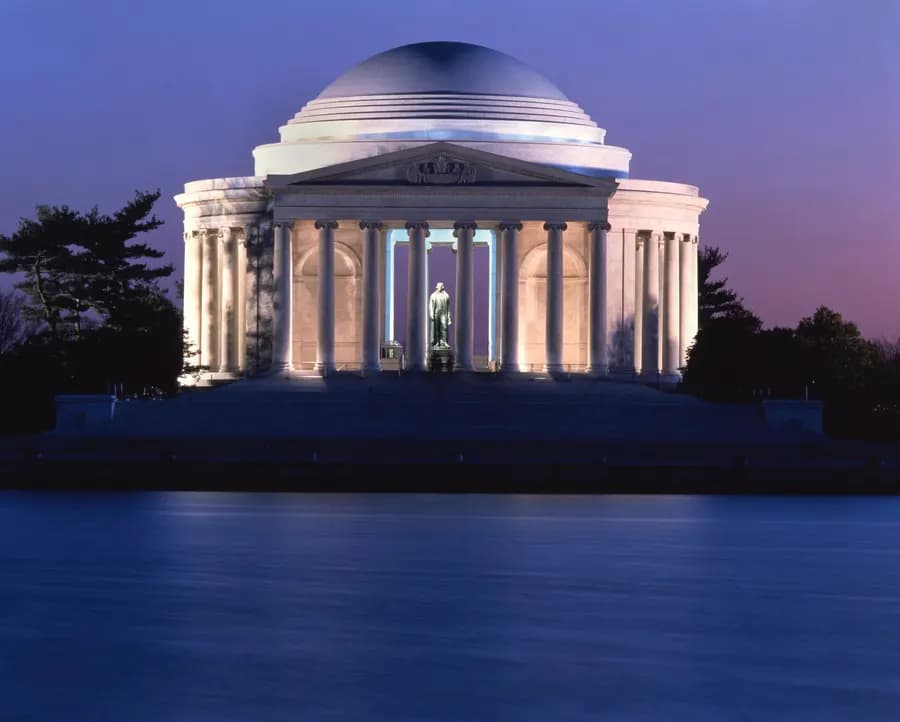
This is the one cover that can't be drawn in the browser. It runs as engravePhoto in Secondbook's image package, with OpenCV compiled to WebAssembly and sharp for decoding, and it takes about a second. On my laptop the two photos I ran for this post took 1.2 and 1.4 seconds. OpenCV is imported lazily, so the parts of the system that never engrave never load it.
Framing before anything
The photo is read first at 400 pixels wide. The sky is grown from the top edge, a flood fill through pixels that change little from their neighbour and stay near the colour where the growth started. Each column's skyline is the first row that isn't sky, and the landmark is the run of columns that rise well above the general skyline. The horizon is the lowest row where upright structure, vertical edges, is still strong across that span. A last test looks below the horizon for blue-green: water gets a reflection, anything else gets ground.
With those three facts the photo is scaled and placed in a 1200 by 1272 pixel box so the landmark fills about 84 % of the width and the horizon sits at 70 % of the height, whatever shape the photo was. Every one of these choices can be overridden per guide: zoom, focus, horizon, what goes below it.
Cutting the landmark out
A photo of a monument has trees, cars, lamp posts and the building next door in it. GrabCut separates the landmark from the rest, and instead of a rectangle drawn by a person, the seeds come from the framing:
let g: number = cv.GC_PR_BGD;
if (!inPhoto[I] || sky[I]! > 0.8 || px < sL - margin || px > sR + margin) g = cv.GC_BGD;
else if (
  Math.abs(px - mid) < 0.18 * (sR - sL) &&
  py > t + 0.15 * rise &&
  py < t + 0.6 * rise &&
  sky[I]! < 0.2
) {
  g = cv.GC_FGD;
  cores++;
} else if (px >= sL && px <= sR && py >= t - 2) g = saliency[i]! >= salient ? cv.GC_PR_FGD : cv.GC_PR_BGD;
seeds[i] = g;
// ...
cv.grabCut(img, mask, new cv.Rect(0, 0, 1, 1), bgd, fgd, 3, cv.GC_INIT_WITH_MASK);
The sky and anything well outside the landmark's span are certainly background. A core in the upper middle of the span is certainly the landmark. The rest of the span is probably the landmark where it stands out from the picture's mean colour in Lab, and probably not where it doesn't. GrabCut runs three iterations on a 320 pixel copy. The cut is cleaned with a morphological open and close, small islands under a fifth of the largest part are dropped, and if the result is implausible (next to nothing, or nearly everything) the function returns null and the pipeline falls back to weighting by sky and span alone.
Lines that follow the stone
The tone the lines follow is made in sharp, not OpenCV: a grayscale copy with a 3-pixel median and CLAHE for local contrast, mixed 55/45 with the photo's own brightness so the big masses keep their weight. Then the landmark's 4th and 96th percentiles become black and white.
The direction comes from the structure tensor, smoothed over a few line spacings. Where the structure is clear, the lines run along it: up the columns, round the arches and the dome. Where it isn't, they fall back to level. Along that field the code traces evenly spaced streamlines with the Jobard and Lefer algorithm: each line grows both ways from a seed until it leaves the landmark or comes within about half a spacing of another line, then new seeds are tried a spacing to either side. The spacing is the box width over 250, 4.8 pixels.
The lines are drawn at twice the size and brought down, which is what makes them swell and thin like a burin cut instead of stepping:
const full = dark[Math.floor(y) * W + Math.floor(x)]! * 0.78 * pitch * 2;
// ...runs of one width, at quarter-pixel positions...
cv.polylines(canvas, vector, false, new cv.Scalar(255), width, cv.LINE_AA, 2);
// ...
cv.resize(canvas, small, new cv.Size(W, H), 0, 0, cv.INTER_AREA);
Each line is split into runs of one width, set by how dark the tone is where it passes, and drawn antialiased with two bits of sub-pixel shift. Where the weight drops to almost nothing the line breaks. In the deepest shadows a diagonal cross-hatch is added on top.
The outlines come from Canny, with thresholds taken from the landmark's own gradients (its 90th percentile) rather than fixed numbers, so a pale limestone facade and a dark brick tower both get edges. Only contours longer than 3 % of the width that lie mostly on the landmark are kept, and never along the frame or the horizon, where the landmark is cut by the box rather than by its own shape. The silhouette of the GrabCut mask is drawn too, a little heavier. Below the horizon the photo is dropped entirely: water becomes the landmark mirrored faintly in level dashes, and ground becomes a sparse hatch whose lines open up toward the reader.
Masks, not pictures
The pipeline's output has no colour in it. It's three alpha masks in WebP: the lines (lossless), the landmark's light as a soft even fill at half size, and optionally the area of one spot colour, such as azulejo blue or a gilded weathervane. The cover paints them with mask-image in its own palette:
// On a dark board the light is the palette's cream and the lines a deep shade of the board; on a light one the
// light is the board lifted toward white and the lines the palette's ink.
const lightTint = dark ? palette.ink : mix(palette.field, '#ffffff', 0.45);
const ink = dark ? mix(palette.field, '#000000', 0.62) : palette.ink;
// ...
<div style={{ ...fill, background: lightTint, ...masked([highlight]) }} />
<div style={{ ...fill, background: ink, ...masked([lines]) }} />
That decision does two jobs. The art always sits on exactly the board's colour, with no halo or off-white background baked into an image. And one render serves every board. Below are the real masks Secondbook's pipeline made from the photo above, on the same 3D book. Switch the board and the same two files repaint, or turn the layers off one by one to see what each mask carries:
Why it gets its own pipeline
Every other cover, even a photo one like the Retrato at the top of this post, is a layout the browser draws on the spot from the guide's data. (Retrato only waits for a coarse measure of the photo's tone, to pick a title ink that reads.) The engraved one needs a photo, a second of CPU and a 15 MB WebAssembly module, so it's made once and stored, and it's the only style whose artwork has to wait for a worker.
The hash covers the photo, every render setting and the renderer's version, so a change of photo or settings is a new key and the same inputs never render twice. The worker recomputes the hash from the job's payload and refuses a job whose hash doesn't match, so no job can write under a key its inputs don't name. It writes lines.webp last, because that file is the marker that the set is complete. Until then the cover shows the board, its texture and the title, and nothing else. An earlier version showed the raw photo as a stand-in, and it was dropped: at that stage a photo just reads as a blur.
When the masks arrive while the cover is on screen, the engraving surfaces like a drop falling into water: rings run out from the centre and reveal it, bending it as they pass. That is the only WebGL in the whole book. A small canvas draws it from the same masks and colours, it's removed when the ripple ends, and at most six play at once, because of the context limit from the start of this post. Covers that load with their masks already made just appear.
Where it isn't worth it
- The light is per face, not per pixel: each face gets one flat veil. The gradients that suggest more (the shade by the hinge, the paper's shadow lines) are painted in by hand, and a large book at a steep angle shows its twelve facets as bands.
- It only works from above: there is no tail and no underside. Tilt the camera below the head and the book is hollow. A product that needs free orbiting wants a real renderer.
- It's many layers: twenty-five composited faces per book add up on a shelf, which is why the shelf hides the hidden faces at rest and sets
will-changeonly while something moves. - The framing is a heuristic: it's tuned for a landmark standing against a sky. The second Highsmith photo I tried, the same memorial from farther across the water, put the horizon under the reflection, because reflected columns have the same upright edges as real ones. Secondbook handles cases like that with per-guide overrides, and a second renderer without the GrabCut cut for glass skylines, where the cut throws towers away.
- Fifteen megabytes of WebAssembly: the worker image carries OpenCV for one cover style. That's fine on a worker and would be absurd in a browser bundle.
The trade
The book is HTML, so it renders on the server, carries real type and costs no WebGL context. In exchange, Secondbook does the renderer's work by hand: a light model in TypeScript that runs once per pose, a camera centred by putting corners through the same projection CSS uses, a shadow posed like the book, and a spring that has to exist twice, once as a linear() curve and once as a frame loop. The engraving makes the opposite trade. It moves the heavy work, OpenCV and a second of CPU, off the page entirely, and leaves the browser the cheapest job there is: paint two masks in a colour.
Credits
Sources
Related articles
A payment processor holds your money for a moment. Paybit deletes that moment: a non-custodial crypto gateway that splits every payment on-chain.